
キーボードでも画面テンキー(ボタン)でも、どちらでも対応できるように作り替えました。
Copilotの功績。
|・`ω・´) …隠れとこ
前回からの発展形ですが、今回だけでも動作するようになるので、未読でも大丈夫です。

ツリー
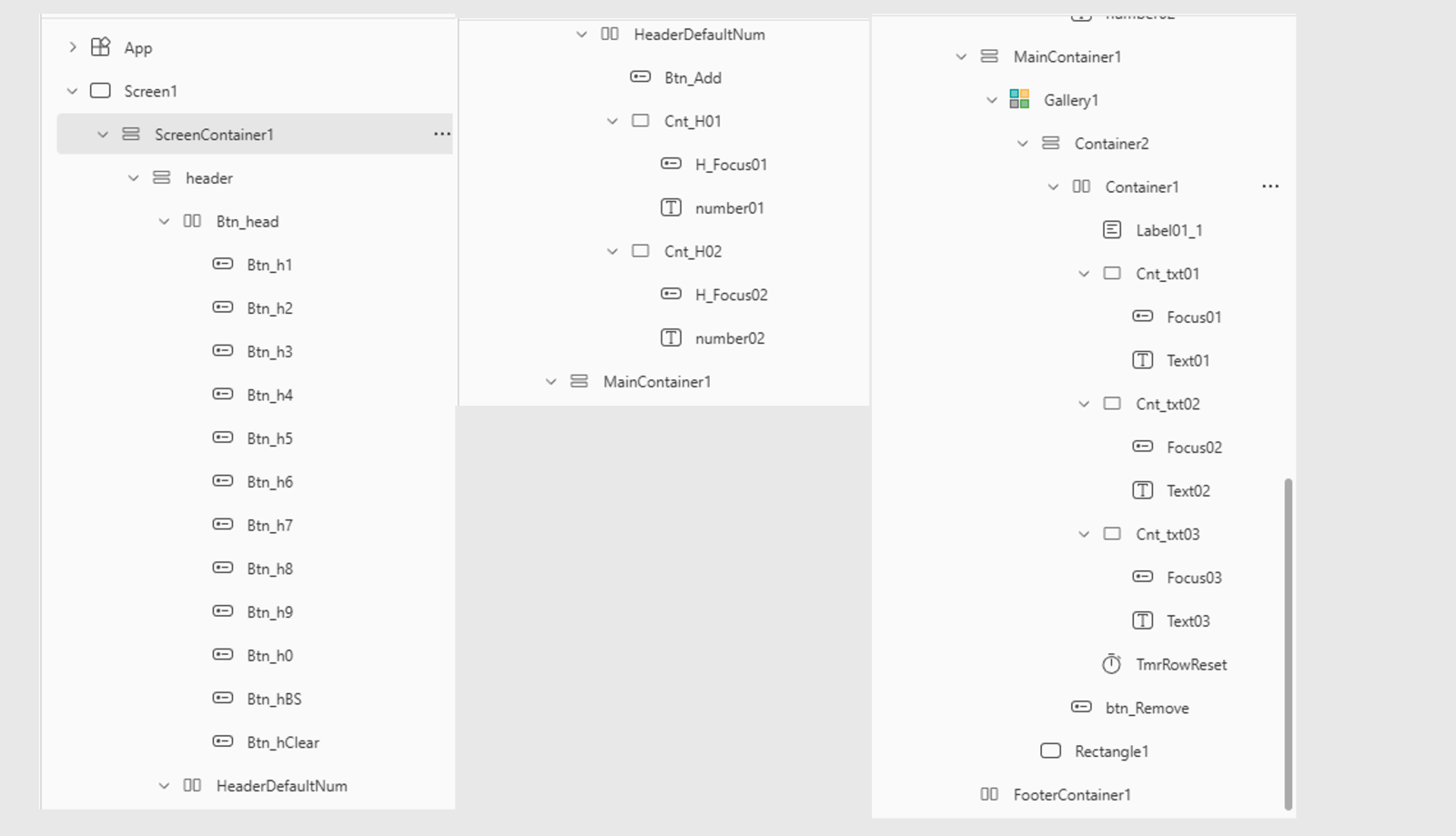
構成
垂直コンテナ
水平コンテナ
テンキー用のボタンを格納(0~9、BS、C)
水平コンテナ
追加ボタン コンテナCnt_H01(テキストインプット1/タゲ取りアイコン) ×2
垂直コンテナ
Gallery
垂直コンテナ
水平コンテナ
ラベル コンテナ(テキストインプット1/タゲ取アイコン)×3
ゴミ箱
※水平コンテナに入れるとブロック単位で強制的に横並びになります。
コンテナにテキストインプットとアイコンを入れ、2つのブロックを重ねています。
テンキーボタン(例:Btn_h9)
Galleryの外にあるテキストインプットと、Galleryの中にあるテキストインプットに、それぞれ数字を入力するためのボタン。
OnSelect
下記は数字「9」を入力するためのもの。
他の数字を入力するときは、1行目の k:”9″} の数字を変更するだけで良いです。
With({ k: "9" },
  Switch(
    ctxActiveTarget,
    "1",
      With(
        { cur: Coalesce(LookUp([@colRows], RowId = ctxActiveItemId, ColValue1), "") },
        UpdateIf([@colRows], RowId = ctxActiveItemId, { ColValue1: cur & k })
      );
      UpdateContext({ ctxResetRowId: ctxActiveItemId, ctxResetTarget: "1", ctxPulse: !ctxPulse }),

    "2",
      With(
        { cur: Coalesce(LookUp([@colRows], RowId = ctxActiveItemId, ColValue2), "") },
        UpdateIf([@colRows], RowId = ctxActiveItemId, { ColValue2: cur & k })
      );
      UpdateContext({ ctxResetRowId: ctxActiveItemId, ctxResetTarget: "2", ctxPulse: !ctxPulse }),

    "3",
      With(
        { cur: Coalesce(LookUp([@colRows], RowId = ctxActiveItemId, ColValue3), "") },
        UpdateIf([@colRows], RowId = ctxActiveItemId, { ColValue3: cur & k })
      );
      UpdateContext({ ctxResetRowId: ctxActiveItemId, ctxResetTarget: "3", ctxPulse: !ctxPulse }),

    "H1",
      With({ cur: Coalesce(ctxHostValue1, "") }, UpdateContext({ ctxHostValue1: cur & k })),

    "H2",
      With({ cur: Coalesce(ctxHostValue2, "") }, UpdateContext({ ctxHostValue2: cur & k })),

    Notify("入力先を選択してください。", NotificationType.Information)
  )
)
Text
"1"ボタン(例:Btn_hBS)
1文字削除するためのボタン
OnSelect
If(
  IsBlank(ctxActiveTarget),
    Notify("入力先を選択してください。", NotificationType.Information),
    Switch(
      ctxActiveTarget,

      // ---- ギャラリー内:Text01
      "1",
        With(
          { cur: Coalesce(LookUp([@colRows], RowId = ctxActiveItemId, ColValue1), "") },
          UpdateIf([@colRows], RowId = ctxActiveItemId, { ColValue1: If(Len(cur) > 0, Left(cur, Len(cur) - 1), "") })
        );
        UpdateContext({ ctxResetRowId: ctxActiveItemId, ctxResetTarget: "1", ctxPulse: !ctxPulse }),

      // ---- ギャラリー内:Text02
      "2",
        With(
          { cur: Coalesce(LookUp([@colRows], RowId = ctxActiveItemId, ColValue2), "") },
          UpdateIf([@colRows], RowId = ctxActiveItemId, { ColValue2: If(Len(cur) > 0, Left(cur, Len(cur) - 1), "") })
        );
        UpdateContext({ ctxResetRowId: ctxActiveItemId, ctxResetTarget: "2", ctxPulse: !ctxPulse }),

      // ---- ギャラリー内:Text03
      "3",
        With(
          { cur: Coalesce(LookUp([@colRows], RowId = ctxActiveItemId, ColValue3), "") },
          UpdateIf([@colRows], RowId = ctxActiveItemId, { ColValue3: If(Len(cur) > 0, Left(cur, Len(cur) - 1), "") })
        );
        UpdateContext({ ctxResetRowId: ctxActiveItemId, ctxResetTarget: "3", ctxPulse: !ctxPulse }),

      // ---- ギャラリー外:number01(Default = ctxHostValue1)
      "H1",
        With(
          { cur: Coalesce(ctxHostValue1, "") },
          UpdateContext({ ctxHostValue1: If(Len(cur) > 0, Left(cur, Len(cur) - 1), "") })
        ),

      // ---- ギャラリー外:number02(Default = ctxHostValue2)
      "H2",
        With(
          { cur: Coalesce(ctxHostValue2, "") },
          UpdateContext({ ctxHostValue2: If(Len(cur) > 0, Left(cur, Len(cur) - 1), "") })
        ),

      // ---- 保険
      Notify("入力先を選択してください。", NotificationType.Information)
    )
)
ボタン(Btn_hClear)
OnSelect
If(
  IsBlank(ctxActiveTarget),
    Notify("入力先を選択してください。", NotificationType.Information),
    Switch(
      ctxActiveTarget,

      // ---- ギャラリー内:Text01
      "1",
        UpdateIf([@colRows], RowId = ctxActiveItemId, { ColValue1: "" });
        UpdateContext({ ctxResetRowId: ctxActiveItemId, ctxResetTarget: "1", ctxPulse: !ctxPulse }),

      // ---- ギャラリー内:Text02
      "2",
        UpdateIf([@colRows], RowId = ctxActiveItemId, { ColValue2: "" });
        UpdateContext({ ctxResetRowId: ctxActiveItemId, ctxResetTarget: "2", ctxPulse: !ctxPulse }),

      // ---- ギャラリー内:Text03
      "3",
        UpdateIf([@colRows], RowId = ctxActiveItemId, { ColValue3: "" });
        UpdateContext({ ctxResetRowId: ctxActiveItemId, ctxResetTarget: "3", ctxPulse: !ctxPulse }),

      // ---- ギャラリー外:number01
      "H1",
        UpdateContext({ ctxHostValue1: "" }),

      // ---- ギャラリー外:number02
      "H2",
        UpdateContext({ ctxHostValue2: "" }),

      // ---- 保険
      Notify("入力先を選択してください。", NotificationType.Information)
    )
)
追加ボタン(Btn_Add)
コレクションに1行追加するためのボタン
OnSelect
Set(_id, GUID());

// 初回のみ明示的に初期化(colRows が空または未生成のとき)
If(
    IsEmpty(colRows),
    ClearCollect(colRows, Table())
);

With(
  {
    h1: If(IsMatch(Coalesce(ctxHostValue1, ""), "^\d*$"), Coalesce(ctxHostValue1, ""), ""),
    h2: If(IsMatch(Coalesce(ctxHostValue2, ""), "^\d*$"), Coalesce(ctxHostValue2, ""), "")
  },
  // 新規行の追加(Host 値を Text01/02 に反映)
  Collect(
    colRows,
    {
      RowId: _id,
      ColValue1: h1,   // ← number01 の値を反映(空なら "")
      ColValue2: h2,   // ← number02 の値を反映(空なら "")
      ColValue3: ""    // ← 3つ目は空で開始
    }
  );

  // 追加直後の状態を更新
  UpdateContext({
    ctxActiveItemId: _id,
    ctxActiveTarget: If(!IsBlank(h1), "1", If(!IsBlank(h2), "2", Blank())),
    ctxResetRowId: Blank(),
    ctxResetTarget: Blank(),
    ctxPulse: false
  })
);
コンテナ(Cnt_H01)
この単一コンテナにテキストインプット(number01)とボタン(H_Focus01)を格納します
テキストインプット(number01)
Default
Coalesce(ctxHostValue1, "")OnChange
// 入力開始=ターゲットを H1 に
UpdateContext({ ctxActiveItemId: Blank(), ctxActiveTarget: "H1" });

If(
  IsMatch(Self.Text, "^\d*$"),
  UpdateContext({ ctxHostValue1: Self.Text }),
  Notify("数字のみ入力可能です。", NotificationType.Warning)
)
OnSelect
UpdateContext({ ctxActiveItemId: Blank(), ctxActiveTarget: "H1" })TriggerOutput
TriggerOutput.Keypressボタン(H_Focus01)
ターゲット(フォーカス)取るためのボタン
Icon
If(ctxActiveTarget = "H1", "Checkmark", "Edit")OnSelect
UpdateContext({ ctxActiveItemId: Blank(), ctxActiveTarget: "H1" })Y
number01.YX
number01.Width -Self.Width -5コンテナ(Cnt_H02)
この中に number02 と H_Focus02 を入れます
テキストインプット(number02)
Default
Coalesce(ctxHostValue2, "")OnChange
UpdateContext({ ctxActiveItemId: Blank(), ctxActiveTarget: "H2" });

If(
  IsMatch(Self.Text, "^\d*$"),
  UpdateContext({ ctxHostValue2: Self.Text }),
  Notify("数字のみ入力可能です。", NotificationType.Warning)
)
OnSelect
UpdateContext({ ctxActiveItemId: Blank(), ctxActiveTarget: "H2" })ボタン(H_Focus02)
Icon
If(ctxActiveTarget = "H2", "Checkmark", "Edit")OnSelect
UpdateContext({ ctxActiveItemId: Blank(), ctxActiveTarget: "H2" })X
number02.Width -Self.Width -5Y
number02.Yコンテナ(MainContainer1)
ヘッダーではなくメイン用の、Galleryを格納するための垂直コンテナ
ギャラリー(Gallery1)
Items
colRows水平コンテナ(Container1)
ギャラリーの中でテキストインプットを横並びにするため、ギャラリーの中に配置
テキスト(Label01_1)
Label01_1
"数字入力"コンテナ(Cnt_txt01)
テキストインプットとタゲ取り用ボタンを格納するためのコンテナ
テキストインプット(Text01)
Default
Coalesce(ThisItem.ColValue1, "")OnChange
If(
  IsMatch(Self.Text, "^\d*$"),
  UpdateContext({ ctxActiveItemId: ThisItem.RowId, ctxActiveTarget: "1" });
  UpdateIf([@colRows], RowId = ThisItem.RowId, { ColValue1: Self.Text }),
  Notify("数字のみ入力可能です。", NotificationType.Warning)
)
OnSelect
UpdateContext({ ctxActiveItemId: ThisItem.RowId, ctxActiveTarget: "1" })Placeholder
"1つ目の数字"ボタン(Focus01)
Icon
If((ctxActiveItemId = ThisItem.RowId) && (ctxActiveTarget = "1"), "Checkmark", "Edit")IconStyle
'ButtonCanvas.IconStyle'.FilledOnSelect
UpdateContext({ ctxActiveItemId: ThisItem.RowId, ctxActiveTarget: "1" });X
Text01.Width -Self.Width -5Y
0コンテナ(Cnt_txt02)
コンテナ3と、その中のテキストインプットとボタンは、ここでは割愛。
実際のAppsの中でコピーして設定を変更して使い回してください。
テキストインプット(Text02)
Default
Coalesce(ThisItem.ColValue2, "")OnChange
If(
  IsMatch(Self.Text, "^\d*$"),
  UpdateContext({ ctxActiveItemId: ThisItem.RowId, ctxActiveTarget: "2" });
  UpdateIf([@colRows], RowId = ThisItem.RowId, { ColValue2: Self.Text }),
  Notify("数字のみ入力可能です。", NotificationType.Warning)
)
OnSelect
UpdateContext({ ctxActiveItemId: ThisItem.RowId, ctxActiveTarget: "2" })Placeholder
"2つ目の数字"ボタン(Focus02)
Icon
If((ctxActiveItemId = ThisItem.RowId) && (ctxActiveTarget = "2"), "Checkmark", "Edit")OnSelect
UpdateContext({ ctxActiveItemId: ThisItem.RowId, ctxActiveTarget: "2" });タイマー(TmrRowReset)
AutoStart
ctxPulse && (ctxResetRowId = ThisItem.RowId) && !IsBlank(ctxResetTarget)Duration
50OnTimerEnd
If(
  ctxResetTarget = "1", Reset(Text01),
  ctxResetTarget = "2", Reset(Text02),
  ctxResetTarget = "3", Reset(Text03)
)
Visible
falseボタン(btn_Remove)
削除用ボタン
Appearance
'ButtonCanvas.Appearance'.SecondaryIcon
"Delete"Layout
'ButtonCanvas.Layout'.IconOnlyOnSelect
Remove(colRows,ThisItem)